
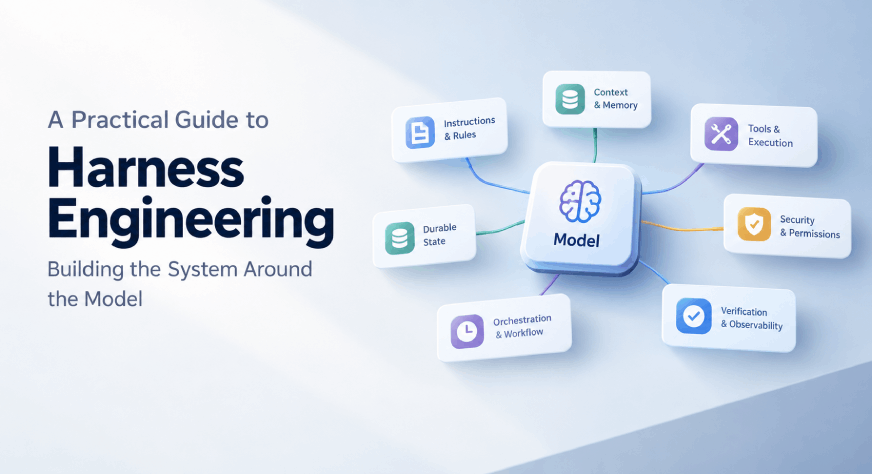
An AI coding agent can write a function in seconds. But a working feature takes more than generated code. The agent needs to understand the project, find the right files, use tools safely, and check whether its changes work. A model on its own does none of that. It sees only the text it is given, and it cannot run a test or save its progress. The system that supplies those things is called a harness, and the work of designing it is called harness engineering. In this guide, we will look at what a harness is, how its parts fit together, and how it differs from prompt and context engineering. Then we will build a small harness in Python, with a sandbox, read-only tests, a step limit, saved progress, and a final check, and watch it handle a messy agent run. Table of contentsWhy a Model Alone Is Not Enough What Is Agent Harness? Prompt, Context, and Harness Engineering The Agent LoopThe Six Layers of a HarnessSecurity and Cost LimitsOur Mini Harness: ArchitectureHands-on Implementation of a Mini Harness How to Improve a HarnessHarnesses Age, and What They Do Not GuaranteeConclusionFrequently Asked Questions Why a Model Alone Is Not Enough A language model generates responses from the information it receives. That simple fact leads to several limits when you ask it to do real work: It does not know which files are in your project unless you show them. It cannot run tests, call a database, or open a browser by itself. It does not remember what happened in an earlier session. It can say the work is done when it is not. It can take actions you did not intend if nothing limits it. It can only hold so much text at once, so too much context hurts. A harness is how we address these limits, one by one. What Is Agent Harness? An agent harness connects the model to information and tools, manages the steps of a task, and checks the result. Depending on the system, it may include: Instructions and project rules Context retrieval and memory Tools such as a terminal, browser, or database A controlled environment where actions run Workflow steps, approvals, and retries Tests, evaluations, and logs The model proposes what to do. The harness provides the information and capabilities needed to do it, and checks what happened. You can already see harnesses in everyday tools. Coding agents such as Claude Code and OpenAI Codex are a model plus a harness: file access, a terminal, project instruction files, permission prompts, and test runs. Two products can use the same model and behave very differently because their harnesses differ. The term is still new. People use “harness” a little differently, sometimes meaning only the tool-running code and sometimes the whole system around the model. This guide uses the broader meaning. Prompt, Context, and Harness Engineering These terms describe related parts of building AI systems. Here is how they compare: Aspect Prompt Engineering Context Engineering Harness Engineering Focus The wording of the instructions What information the model sees The whole system around the model Key Question How should I ask? What does the model need to know? What must it see, do, and verify? Example “Review this function and explain any security risks.” The function, related files, coding standards, test failures, and documentation A way to run tests and report results, linters that enforce architecture, and saved progress What It Controls The instructions The information supplied Context, tools, permissions, workflow, state, and checks Limit Can ask for tests but cannot run them on its own Can supply facts but cannot act or verify on its own Cannot guarantee every result is correct A prompt can tell an agent to run the tests. The harness must give it a way to run them and report whether they passed. A prompt can say “follow our architecture.” The harness can make the architecture easy to find and enforce important boundaries with tests or linters. These areas overlap, and a practical distinction is that harness engineering includes the runtime and controls around the model. The Agent Loop The harness does not call the model once. It runs a loop: build the context, let the model propose an action, run the action and check the result, then repeat. The loop ends when the checks pass. It also ends when a limit is reached, such as a step cap, and the agent reports where it stopped or asks a person for help. The harness rebuilds the context on every pass, so the model always sees the latest results. The model can say it is finished, but the harness decides whether the checks actually pass. The Six Layers of a Harness The exact design depends on the application, but most harnesses need six layers. Security and cost cut across all of them and get their own section after this one. 1. Instructions: make the rules clear Instructions give an agent a starting point. In a code repository, a short AGENTS.md or CLAUDE.md file can explain how to navigate the project, where to find deeper documentation, and which checks to run. Keep this entry point focused, and link to maintained documents for architecture, testing, security, and product behavior. Practical takeaway: Treat the main instruction file as a map to reliable project knowledge, not as a complete manual. 2. Context: provide the right information More context is not always better. Loading too many unrelated files can bury the details that matter, and every model has a limit on how much it can hold at once. Common techniques are: Search and retrieval: let the agent search the repository or documentation instead of loading everything up front. Summarizing long tool output: keep the useful lines of a 5,000-line test log, not all of it. Compaction: when the conversation gets long, replace older history with a short summary. Notes for later: write key findings to a file the agent can re-read. Sub-agents with clean context: hand a side task to a separate agent and take back only its short answer. Practical takeaway: Give the agent a clear path to the information it needs, and keep its working context focused. 3. Tools and execution: let the agent act safely Tools let an agent do more than generate text. The harness decides where those actions run and what the agent can access. For example, it might let an agent edit files in an isolated workspace while blocking access to production systems, and require human approval before actions with external consequences. Clear tool names, simple inputs, and error messages the model can act on make tools easier to use correctly. Practical takeaway: Give the agent only the tools and permissions needed for its task. 4. Durable state: preserve progress between sessions A model’s active context is temporary. If the plan and progress exist only in the conversation, the next run may repeat work or make wrong assumptions. A harness can save a task plan, decision log, test results, or a summary of what is done and what remains, so the next session has a reliable place to resume. Practical takeaway: Save progress outside the model’s temporary context. 5. Orchestration: manage the sequence of work Orchestration controls how an agent moves through a task: which step comes next, whether a failed action is retried, and when the agent should stop or ask a person. Multiple agents can help when tasks divide cleanly, but adding agents does not automatically improve the result. Each needs a clear role, enough context, and a way to check or combine its work. Practical takeaway: Add workflow steps and handoffs to solve a real coordination need, and keep the process as simple as the task allows. 6. Verification and observability: check the work and understand failures An agent’s final message is not proof that its work is correct. The harness needs checks that provide evidence, such as tests, type checks, build results, or evaluations. Observability, meaning tool-call histories, logs, and traces, shows where the agent went wrong and helps teams improve the system. Practical takeaway: Define what “done” means before the agent starts, and check the result with evidence. Security and Cost Limits An agent that can run commands and read files can also make mistakes at speed. A harness should limit the damage and keep the loop bounded. Security: treat the agent as an untrusted worker Sandboxing: run actions in an isolated environment with no access to production systems or secrets it does not need. Least privilege: give each tool the narrowest permissions that work, for example read-only database access unless writes are required. Approval gates: require a person to confirm actions that are hard to undo, such as deleting data, sending messages, or deploying. Prompt injection: text the agent reads, such as a web page, an issue comment, or a file, can contain instructions that try to steer it. Treat all outside content as data, keep sensitive tools away from steps that read untrusted text, and require approval before risky actions that follow it. Audit trail: log every tool call so you can review what the agent did. Cost: keep the loop bounded Step and time limits: stop after a set number of steps or minutes and report where things stand. Token budgets: cap how much context and output a task may use. Retry caps: retry a failed action a few times, then escalate instead of repeating it forever. Right-sized models: use a smaller, faster model for simple steps and a stronger one for hard decisions. Practical takeaway: Assume the agent will sometimes be wrong or misled, and design permissions and limits so a mistake stays small and cheap. Our Mini Harness: Architecture Now let us put these ideas into code. The task is a bug where a checkout function applies a discount twice. The agent must fix it without editing the tests. Each part of the diagram maps to a layer from the previous section: Part Layer What It Does in Our Code Build context Instructions, context Loads AGENTS.md into the system prompt and clips long tool output Tool gate Tools and execution Keeps paths inside the workspace and makes tests/ and AGENTS.md read-only Verify Verification Runs the tests itself before accepting “finish” State file Durable state Saves each step and the final status to .harness/state.json Step limit Orchestration, cost Stops the loop after a set number of steps The model is swappable. We will use a scripted model that plays back fixed actions, so the demo runs offline and gives the same output every time. We will also show a small adapter for a real model. Hands-on Implementation of a Mini Harness Everything below lives in one flat file, harness_demo.py, which comes with this guide. You can read it top to bottom, or run it as is. Install Dependencies The offline demo uses only the Python standard library (Python 3.9 or newer), so there is nothing to install. To try a real model later, install the Anthropic SDK and set your key as an environment variable, so it never appears in your code. pip install anthropic export ANTHROPIC_API_KEY="your-key-here" Create the Sample Project We start with a tiny project that has a deliberate bug, a test file, and a short AGENTS.md with the project rules. The function make_workspace builds this in a temporary folder. It also creates a secrets.txt file outside the workspace, so we can test the sandbox later. AGENTS_MD = """\ # Project rules - Source code lives in checkout.py. - Tests live in tests/ and are read-only. Never edit them. - Run run_tests before you call finish. """ CHECKOUT_PY = """\ def apply_discount(price, percent): return round(price * (1 - percent / 100), 2) def checkout_total(items, discount_percent=0): subtotal = sum(i["price"] * i["qty"] for i in items) total = apply_discount(subtotal, discount_percent) total = apply_discount(total, discount_percent) # BUG: applied twice return total """ TEST_PY = """\ import unittest from checkout import checkout_total class CheckoutTests(unittest.TestCase): def test_discount_applied_once(self): items = [{"price": 50, "qty": 2}] self.assertEqual(checkout_total(items, 10), 90.0) def test_no_discount(self): items = [{"price": 50, "qty": 2}] self.assertEqual(checkout_total(items), 100.0) if __name__ == "__main__": unittest.main() """ def make_workspace(): root = Path(tempfile.mkdtemp(prefix="harness_demo_")) ws = root / "workspace" (ws / "tests").mkdir(parents=True) (ws / "AGENTS.md").write_text(AGENTS_MD) (ws / "checkout.py").write_text(CHECKOUT_PY) (ws / "tests" / "test_checkout.py").write_text(TEST_PY) (root / "secrets.txt").write_text( "this file is outside the sandbox" ) return ws Define the Tools The model needs to know what it can do. Each tool has a name, a description, and an input schema. Notice the finish tool: the model uses it to say it is done, but the harness will check that claim before accepting it. TOOL_SPECS = [ { "name": "list_files", "description": "List the project files.", "input_schema": { "type": "object", "properties": {} } }, { "name": "read_file", "description": "Read one project file.", "input_schema": { "type": "object", "properties": { "path": {"type": "string"} }, "required": ["path"] } }, { "name": "write_file", "description": "Replace a project file with new full content.", "input_schema": { "type": "object", "properties": { "path": {"type": "string"}, "content": {"type": "string"} }, "required": ["path", "content"] } }, { "name": "run_tests", "description": "Run the project's tests.", "input_schema": { "type": "object", "properties": {} } }, { "name": "finish", "description": "Say the task is done. The harness checks it first.", "input_schema": { "type": "object", "properties": { "summary": {"type": "string"} }, "required": ["summary"] } }, ] class PermissionDenied(Exception): pass Build the Harness The Harness class holds the workspace, the model, the step limit, and an optional approval function. We build it in five pieces. class Harness: READ_ONLY = ("tests/", "AGENTS.md") def __init__( self, workspace, model, max_steps=8, max_output_chars=600, approve=None ): self.ws = Path(workspace).resolve() self.model = model self.max_steps = max_steps self.max_output_chars = max_output_chars self.approve = approve or (lambda tool, args: True) self.steps = [] Piece 1: permissions. Every path the model gives us is resolved and checked. A path that leaves the workspace is denied, and so is writing to tests/ or AGENTS.md. This is least privilege in a few lines. # -- permissions: keep every path inside the workspace ------------ def resolve(self, rel, write=False): path = (self.ws / rel).resolve() if path != self.ws and self.ws not in path.parents: raise PermissionDenied("path is outside the workspace") name = path.relative_to(self.ws).as_posix() if write and name.startswith(self.READ_ONLY): raise PermissionDenied(f"{name} is read-only") return path Piece 2: context. Tool output can be huge. The clip method trims it to a limit and hides the temporary folder path, so the model’s context stays short and clean. # -- context: keep tool output short ------------------------------ def clip(self, text): text = text.replace(str(self.ws), "") extra = len(text) - self.max_output_chars if extra > 0: text = ( text[:self.max_output_chars] + f"\n...[{extra} more chars]" ) return text Piece 3: tools. These are the actions. The execute method wraps them, so a denied or failed action becomes a short message for the model instead of a crash. The write_file tool also calls the approval function, which is where a person could confirm each change. # -- tools -------------------------------------------------------- def list_files(self): files = [ p.relative_to(self.ws).as_posix() for p in sorted(self.ws.rglob("*")) if p.is_file() and ".harness" not in p.parts and "__pycache__" not in p.parts ] return "\n".join(files) def read_file(self, path): return self.resolve(path).read_text() def write_file(self, path, content): target = self.resolve(path, write=True) if not self.approve("write_file", {"path": path}): raise PermissionDenied("a person declined this change") target.write_text(content) return f"wrote {path}" def run_tests(self): proc = subprocess.run( [ sys.executable, "-m", "unittest", "discover", "-s", "tests", ], cwd=self.ws, capture_output=True, text=True, timeout=20, env={ **os.environ, "PYTHONPATH": str(self.ws), "PYTHONDONTWRITEBYTECODE": "1", }, ) return proc.returncode == 0, proc.stdout + proc.stderr def execute(self, name, args): try: if name == "run_tests": return "ok", self.run_tests()[1] if name in ("list_files", "read_file", "write_file"): return "ok", getattr(self, name)(**args) return "error", f"unknown tool: {name}" except PermissionDenied as err: return "blocked", f"DENIED: {err}" except Exception as err: # bad arguments, missing file, ... return "error", f"ERROR: {err}" Piece 4: durable state. After every step, the harness writes what happened to a JSON file. If a run stops, the next session can read this file and resume. # -- durable state: progress survives the session ----------------- def save_state(self, task, status): folder = self.ws / ".harness" folder.mkdir(exist_ok=True) (folder / "state.json").write_text( json.dumps( { "task": task, "status": status, "steps": self.steps, }, indent=2, ) ) def log(self, step, text): print(f"[step {step}] {text}") Piece 5: the loop. This is the core. On each pass, the harness asks the model for an action, runs it, and adds the result to the conversation. When the model calls finish, the harness runs the tests itself. If they fail, the finish is rejected and the failure goes back to the model. If the loop runs out of steps, it stops and says so. # -- the loop ----------------------------------------------------- def run(self, task): system = ( "You are a coding agent in a small Python project. " "Use the tools to inspect, edit, and test. " "Call finish only when you are done.\n\n" + (self.ws / "AGENTS.md").read_text() ) messages = [{"role": "user", "content": task}] for step in range(1, self.max_steps + 1): action = self.model.decide(system, messages, TOOL_SPECS) name, args = action["name"], action["input"] shown = json.dumps(args) self.log(step, f"model -> {name} {shown[:50]}") if name == "finish": passed, output = self.run_tests() if passed: self.log(step, "check: tests pass, finish accepted") self.steps.append({ "step": step, "tool": name, "outcome": "accepted", }) self.save_state(task, "done") return "done" outcome = "rejected" result = ( "REJECTED: tests still fail.\n" + self.clip(output) ) self.log(step, "check: tests FAIL, finish rejected") else: outcome, result = self.execute(name, args) result = self.clip(result) if outcome != "ok": self.log(step, result[:60]) self.steps.append({ "step": step, "tool": name, "outcome": outcome, }) self.save_state(task, "running") messages.append({ "role": "assistant", "content": [ { "type": "tool_use", "id": action["id"], "name": name, "input": args, } ], }) messages.append({ "role": "user", "content": [ { "type": "tool_result", "tool_use_id": action["id"], "content": result, } ], }) self.log(self.max_steps, "step limit reached, stopping") self.save_state(task, "stopped: step limit") return "stopped: step limit" Add a Model The harness only needs an object with a decide method. Our ScriptedModel plays back a list of actions, which makes the demo repeatable and free to run. class ScriptedModel: """Plays back fixed actions so the demo runs offline.""" def __init__(self, actions): self.actions = actions self.i = 0 def decide(self, system, messages, tools): name, args = self.actions[ min(self.i, len(self.actions) - 1) ] self.i += 1 return { "id": f"toolu_{self.i}", "name": name, "input": args, } For a real model, the ClaudeModel adapter sends the conversation and the tool list to the Anthropic API and returns the first tool call. We turned off parallel tool use so the model makes one move per step. Note that the demo output below comes from the scripted model. We did not run this adapter for this guide, so treat it as a starting point and test it with your own key. class ClaudeModel: """Optional: a real model. Not needed for the offline demo.""" def __init__(self, model=None): import anthropic self.client = anthropic.Anthropic() self.model = model or os.environ.get( "CLAUDE_MODEL", "claude-sonnet-5-5", ) def decide(self, system, messages, tools): reply = self.client.messages.create( model=self.model, max_tokens=1500, system=system, tools=tools, tool_choice={ "type": "auto", "disable_parallel_tool_use": True, }, messages=messages, ) for block in reply.content: if block.type == "tool_use": return { "id": block.id, "name": block.name, "input": block.input, } text = " ".join( b.text for b in reply.content if b.type == "text" ) return { "id": "no_tool", "name": "finish", "input": {"summary": text}, } Define the Test Scenarios Scenario 1 is a messy but successful run. The scripted model first claims it is done too early, then tries to weaken the tests, then tries to read a file outside the sandbox, and only then makes the real fix. Scenario 2 is an agent stuck in a loop, repeating the same action. FIXED_CHECKOUT = """\ def apply_discount(price, percent): return round(price * (1 - percent / 100), 2) def checkout_total(items, discount_percent=0): subtotal = sum(i["price"] * i["qty"] for i in items) return apply_discount(subtotal, discount_percent) """ TASK = "Fix the bug where checkout applies the discount twice." SCENARIO_1 = [ ("list_files", {}), ("read_file", {"path": "checkout.py"}), ("finish", {"summary": "Fixed."}), # too early: nothing changed yet ( "write_file", { "path": "tests/test_checkout.py", "content": "# tests removed", }, ), # tries to cheat ("read_file", {"path": "../secrets.txt"}), # tries to leave the sandbox ( "write_file", { "path": "checkout.py", "content": FIXED_CHECKOUT, }, ), ( "finish", {"summary": "Removed the second apply_discount call."}, ), ] SCENARIO_2 = [ ("read_file", {"path": "checkout.py"}) ] # loops forever if __name__ == "__main__": if "--claude" in sys.argv: print("=== Real model ===") Harness( make_workspace(), ClaudeModel(), max_steps=10, ).run(TASK) else: print("=== Scenario 1: a messy but successful run ===") Harness( make_workspace(), ScriptedModel(SCENARIO_1), ).run(TASK) print("\n=== Scenario 2: an agent stuck in a loop ===") Harness( make_workspace(), ScriptedModel(SCENARIO_2), max_steps=5, ).run(TASK) Test Our Mini Harness Run the script with python harness_demo.py. Here is what happens in Scenario 1: OUTPUT [step 1] model -> list_files {} [step 2] model -> read_file {"path": "checkout.py"} [step 3] model -> finish {"summary": "Fixed."} [step 3] check: tests FAIL, finish rejected [step 4] model -> write_file {"path": "tests/test_checkout.py", "content": "# t [step 4] DENIED: tests/test_checkout.py is read-only [step 5] model -> read_file {"path": "../secrets.txt"} [step 5] DENIED: path is outside the workspace [step 6] model -> write_file {"path": "checkout.py", "content": "def apply_disc [step 7] model -> finish {"summary": "Removed the second apply_discount cal [step 7] check: tests pass, finish accepted Read the output step by step: Step 3: The model says “Fixed” before changing anything. The harness runs the tests, they fail, and the finish is rejected. The model’s word alone was not enough. Step 4: The model tries to overwrite the test file. The tool gate denies it, because tests are read-only. Step 5: The model tries to read a file outside the workspace. The sandbox denies it. Steps 6 and 7: The model makes the real fix. This time the tests pass, so the harness accepts the finish. The harness also saved its progress. Here is the start of the state file after this run: OUTPUT (.harness/state.json, excerpt) { "task": "Fix the bug where checkout applies the discount twice.", "status": "done", "steps": [ { "step": 1, "tool": "list_files", "outcome": "ok" }, { "step": 2, "tool": "read_file", "outcome": "ok" }, { ... Now Scenario 2, where the agent loops on the same action: OUTPUT [step 1] model -> read_file {"path": "checkout.py"} [step 2] model -> read_file {"path": "checkout.py"} [step 3] model -> read_file {"path": "checkout.py"} [step 4] model -> read_file {"path": "checkout.py"} [step 5] model -> read_file {"path": "checkout.py"} [step 5] step limit reached, stopping The step limit stops the run after 5 steps and records the status. Without it, a stuck agent would keep spending tokens. Run with a Real Model (Optional) To swap in a real model, run python harness_demo.py --claude. The harness code does not change. Only the object that decides the next action changes. A real model will choose its own steps, so its trace will differ from the scripted one. That is the point of a harness: whatever the model does, the same sandbox, checks, and limits apply. How to Improve a Harness When an agent fails, rewriting the prompt or switching models may help. But first, look at how the whole system handled the task: Did the agent receive the right information? Could it find the relevant files or data? Did the tools work as expected? Were its permissions too broad or too limited? Was progress saved between sessions? Did a check catch the error? Then improve the part that caused the failure. If the agent repeatedly misses a project convention, make it easier to find or enforce it with a check. If it edits the wrong files, narrow the task or limit its workspace. If it reports success without running tests, make test results part of the completion criteria, as our harness does. Measure the change A fix that works once may not work in general. Keep a small set of representative tasks, run them before and after each harness change, and compare pass rate, number of steps, cost, and time. Read the logs of a few failed runs as well, since numbers alone do not show why an agent failed. Without this, harness changes are guesses. Ideas to extend our mini harness Pass an approve function to Harness so a person confirms every write. Add a compaction step that summarizes old messages when the history gets long. Add more tools, such as a search tool, and give each its own permission rule. Run a set of tasks automatically and record the pass rate for each version of the harness. Harnesses Age, and What They Do Not Guarantee Many harness features exist to work around what a model cannot do well today, such as forgetting earlier steps or stopping too early. As models improve, some workarounds become unnecessary and can get in the way. Review the harness when you change models: remove a piece, re-run your test tasks, and keep the piece only if results get worse without it. Keep the checks that protect against real risks, such as security limits and tests. A well-designed harness makes an agent’s work more controlled and easier to evaluate, but it cannot guarantee that every result is correct. Tests may miss important cases. Documentation may be out of date. Tools may return incomplete information. Harness engineering does not remove the need for software engineering judgment. It gives teams more ways to guide the agent, check its work, and learn from failures. Conclusion In this guide, we went through why a model alone is not enough, what a harness is, and how harness engineering differs from prompt and context engineering. We covered the agent loop, the six layers of a harness, and the security and cost limits that cut across them. Then we built a mini harness in Python and tested it on a messy run and a stuck run. The main lesson is that reliability comes from the system around the model. In our demo, the scripted model made three mistakes in a row, and the harness still reached a correct result because it checked the work, blocked unsafe actions, and kept the loop bounded. Try extending harness_demo.py with an approval step, a compaction step, or your own tools and tests. Then measure whether each change helps. Frequently Asked Questions Q1. What is harness engineering in simple terms? A. Harness engineering is the work of building the system around a model so it can get the right context, use tools safely, follow a workflow, save progress, and verify results. Q2. How is a harness different from a prompt? A. A prompt tells the model what to do. A harness gives the model the environment, tools, permissions, memory, and checks needed to actually do the work and prove whether it succeeded. Q3. Do I need a harness for every AI application? A. Not always. A simple chat or drafting task may not need much harnessing. A task that edits files, calls tools, handles data, or affects users usually needs stronger controls and verification. Hi, I am Janvi, a passionate data science enthusiast currently working at Analytics Vidhya. My journey into the world of data began with a deep curiosity about how we can extract meaningful insights from complex datasets.
A Practical Guide to Harness Engineering: Building the System Around the Model
Full Article
Original Source
Read the full article at Analyticsvidhya →KhanList aggregates and links to publicly available news content. We do not host full articles from third-party sources. Always verify important information with original sources.