
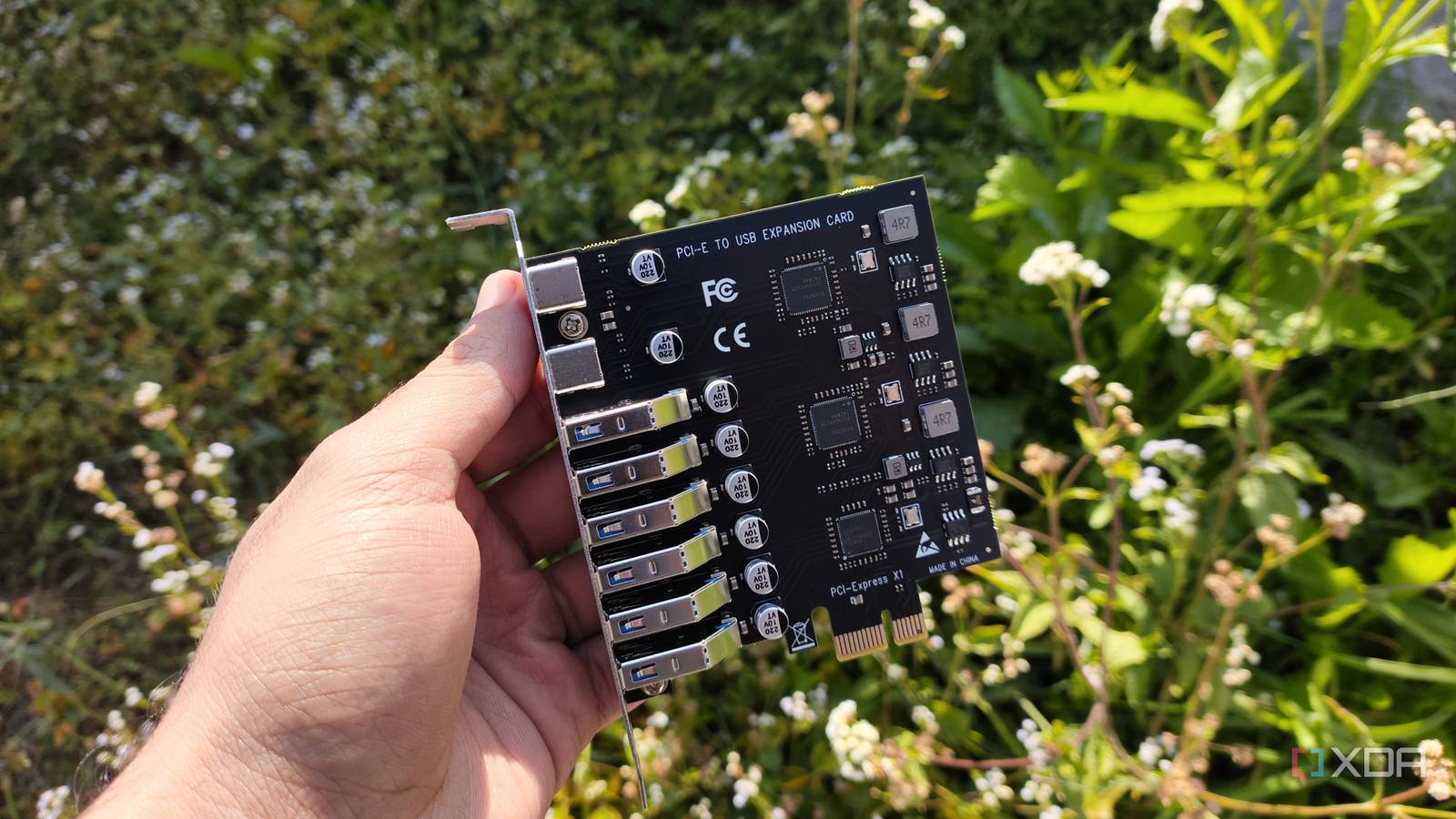
Published Nov 28, 2026, 12:00 PM EST Ayush Pande is a PC hardware and gaming writer. When he's not working on a new article, you can find him with his head stuck inside a PC or tinkering with a server operating system. Besides computing, his interests include spending hours in long RPGs, yelling at his friends in co-op games, and practicing guitar. After jumping head-first into the home labbing rabbit hole, I quickly realized the sheer upgrade potential vacant PCIe slots bring to the table. The home server I built from an aged Xeon PC, for example, has painfully slow Ethernet speeds. But tossing a spare network card helped me add 10 gigabit capabilities to this beast of a workstation. Likewise, since I couldn’t accommodate all the extra HDDs I’d salvaged from dead systems into this PC, I used an HBA card to bolster its capacity for SATA and (more importantly) SAS connectivity. That said, typical gaming systems and daily drivers can benefit just as much from PCIe cards. And I’m not just talking about the pixel-pushing GPU I’ve slotted into my PC’s x16 slot, either. PCIe-to-USB cards can add extra I/O ports to cheap motherboards, and it’s thanks to one such card that an old PC in my arsenal can now accept devices requiring fast USB Type-C connectivity. My old motherboard doesn’t have a single USB Type-C port And I was also starting to run out of ports on my mobo With the RAM shortage making CPU upgrades borderline impossible for budget PC builders, I’ve still got a MSI B450 A-Pro motherboard that chugs along nicely as a second system in my house. On the surface, the fact that I can only go as high as Ryzen 5000 processors and DDR4 memory modules is the biggest problem with this motherboard. But over the years, I’ve also noticed a couple of issues with its I/O capabilities. For example, its lack of USB Type-C ports is a problem that I only started noticing a while ago. Up until a few months ago, Type-C to Type-A adapters (and cables) worked well whenever I needed to hook different I/O devices up to my secondary system. Heck, that’s how I use my Audeze Maxwell’s USB dongle, Cooler Master MasterHUB, DIY hybrid DAS, and a bunch of other gizmos with it. But as my arsenal of I/O devices began to grow, I had to fiddle with multiple dongles just to make things work. Not to mention, I was also starting to run out of ports on my mobo. I recently tried adding a new 4K webcam to this PC, but between all the extra components I’d plugged into my PC, I couldn’t even find a spare port for it, let alone a dongle for its USB Type-C cable. Plus, I didn’t want to use a slow USB 2.0 interface for this high-quality camera. In the end, I decided to bite the bullet and invest in a dedicated PCIe-to-USB adapter card. A cheap USB-C expansion card fixed my I/O problems It plays well with my mobo’s spare PCIe slot When I went hunting for PCIe cards capable of adding more USB Type-C ports to my PC, I figured I’d probably have to spend at least $80 on one. But to my surprise, PCIe-to-USB-C expansion cards are fairly inexpensive, with the one I settled on costing roughly $20. While it does have a maximum cap of 5 Gbps instead of the generous 10 Gbps on expensive boards, the 2x USB Type-C sockets and 4x USB Type-A ports are more than enough to fix my connectivity problems. Unlike the NIC I’ve plugged into my daily driver, where I had to hunt for the right drivers on TP-Link’s website, Windows 11 detected this PCIe card instantly. So far, I’ve tested it with everything from my webcam to my DIY DAS, and the USB Type-C ports delivered rock-solid speeds. The best part? The USB-C expansion card only needs a PCIe Gen 2 slot to work its magic, which is pretty neat for my old motherboard. Plus, I also get four USB Type-A ports alongside their Type-C counterparts, and the extra connectivity options definitely come in handy when I need to tinker with the DIY USB gadgets I often build with my ESP32-S3 boards. In fact, I ended up picking a second USB-C expansion card for my Xeon home server, as I really needed the extra ports for the Bluetooth dongle, microphone, drawing tablet, microcontrollers, and all other wacky I/O devices I wish to pair with my virtual machines using USB passthrough. PCIe cards can add some much-needed improvements to old PCs Besides my USB Type-C expansion card, I’ve added a couple of other PCIe cards to my non-server systems. My B450 mobo, for example, only supports 1 gigabit Ethernet speeds, but since I had a couple of PCIe slots vacant, I grabbed a cheap $15 NIC capable of adding 2.5G speeds to my outdated companion. Likewise, I’ve outfitted my daily driver and Xeon workstation with TX-401 NICs, so I could transfer files between them over blazing-fast 10GbE speeds. PCIe USB-C expansion card
A cheap USB-C expansion card brought my old desktop up to date with every modern peripheral I own
Full Article
Original Source
Read the full article at Xda-developers →KhanList aggregates and links to publicly available news content. We do not host full articles from third-party sources. Always verify important information with original sources.